01
Add job details when you are ready
Start without setting up a job profile or adding a CV. Add your CV and job description later for more personal answers, and keep each opportunity in its own profile.
 OfferAlly
For your next opportunity · Windows x64
Start without setting up a job profile or question bank. Add your CV and job description later for answers that draw on your experience, and keep a separate profile for each opportunity.
No card required. Windows app. Internet needed for AI features.
Already have an account? Download for Windows
Start now. Add your preparation later.
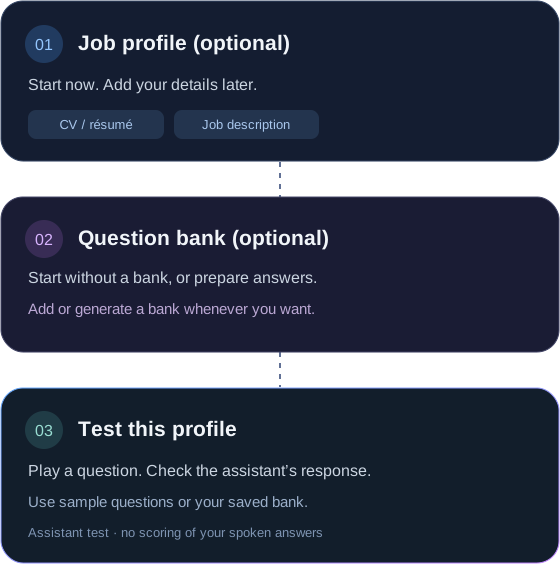
A repeatable way to prepare
01
Start without setting up a job profile or adding a CV. Add your CV and job description later for more personal answers, and keep each opportunity in its own profile.
02
Start without a question bank and let the assistant generate answers using any context you've supplied. Add, import or generate a bank later if you want to prepare specific answers.
03
Use sample questions, or questions from your optional bank, to check the assistant’s responses and your audio setup.
The mock interview tests the assistant with or without a question bank. New AI answers use one credit each; reusing a prepared answer uses none. It does not grade your spoken answers or provide an interview score.
Live features capture audio for transcription and generate suggestions. Use them only with the required consent and permission from the interviewer. AI output needs your review.
Profiles are saved on your device. Relevant context is sent to service providers when you generate an answer. Local interview history is optional.
Read how data is handledSimple, one-time pricing
Try it with your next role
10 trial credits. No card required.
One simple credit pack
300 credits. No subscription.
One new AI generation uses one credit, including a draft bank request. Listening and reusing an existing prepared answer do not use generation credits. Prices are charged in GBP; your card provider may apply currency conversion fees. See terms and refund details.
Before you start
No. Activate the app and check your audio, then start without setting up a job profile, adding a CV or pasting a job description. The app starts in Interview with a blank default profile. Without your details, responses are general suggestions. Add your experience later for more personal answers. Check every answer and never present invented or hypothetical examples as your own experience.
No. Leave the bank empty and start with general answers or any profile details you've supplied. Add prepared answers later if you want more control over specific questions.
It plays saved questions, or three sample questions when your bank is empty, through your selected speakers or headphones. It checks audio, transcription and the assistant's responses for that profile. It does not grade your spoken answers.
One new AI generation uses one credit, including a draft bank request. Directly reusing a prepared answer uses none. Listening and idle time do not use generation credits. AI generation and transcription need an internet connection.
The desktop app requires Windows x64. For version 0.2.0, use a currently supported Windows 11 release. macOS, mobile and a browser-only assistant are not available.
Only where assistance is permitted, with the required consent for audio processing. Check the interviewer's rules and review generated answers for accuracy. Screen-capture behavior depends on Windows, your display setup and the video-call platform; it is not guaranteed.
Job profiles stay on your device. Relevant audio, questions and context are processed by service providers for live features. Local interview history is optional and off by default. Read the Privacy Policy for cloud processing, retention and data controls.
Find more answers in the full FAQ, or read the Privacy Policy.
Activate. Check your audio. Add preparation when you are ready.